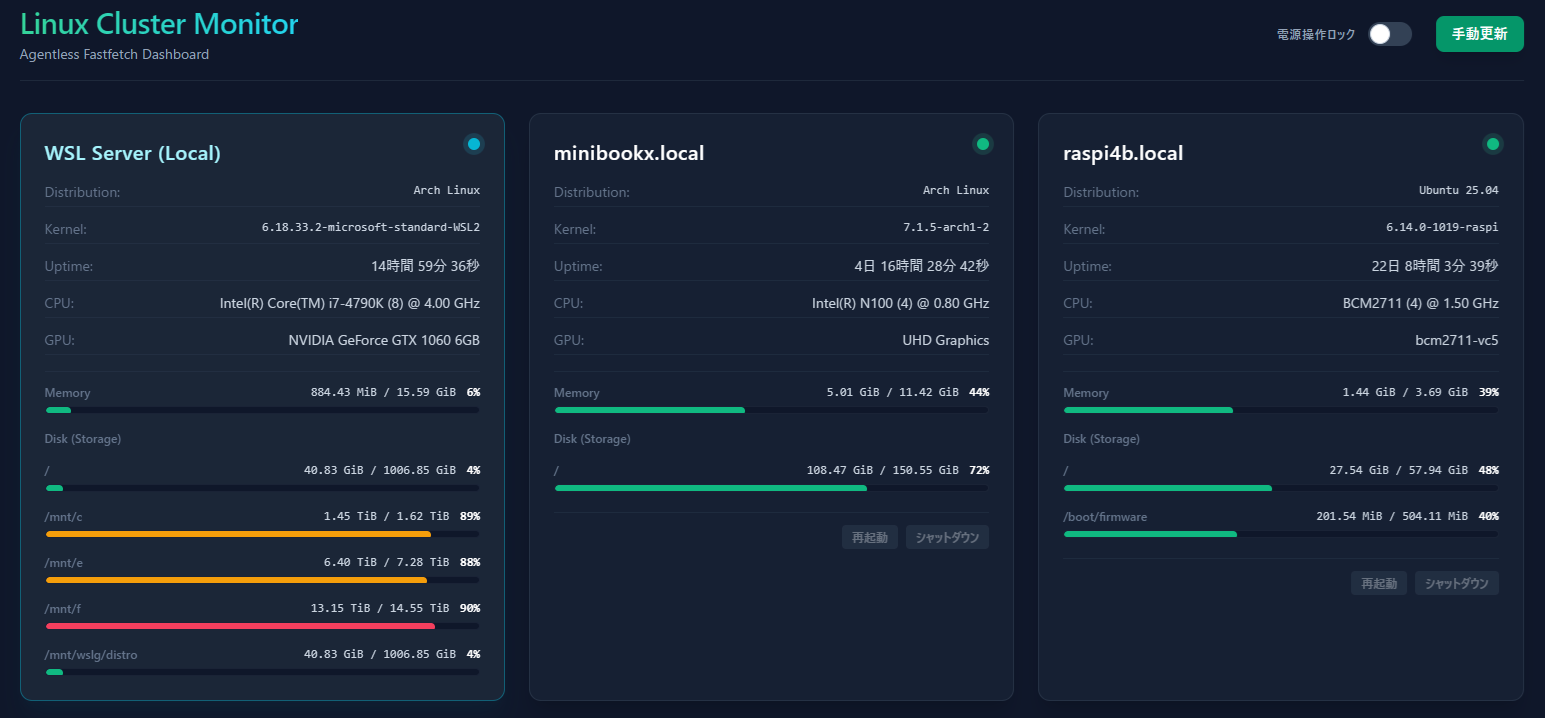
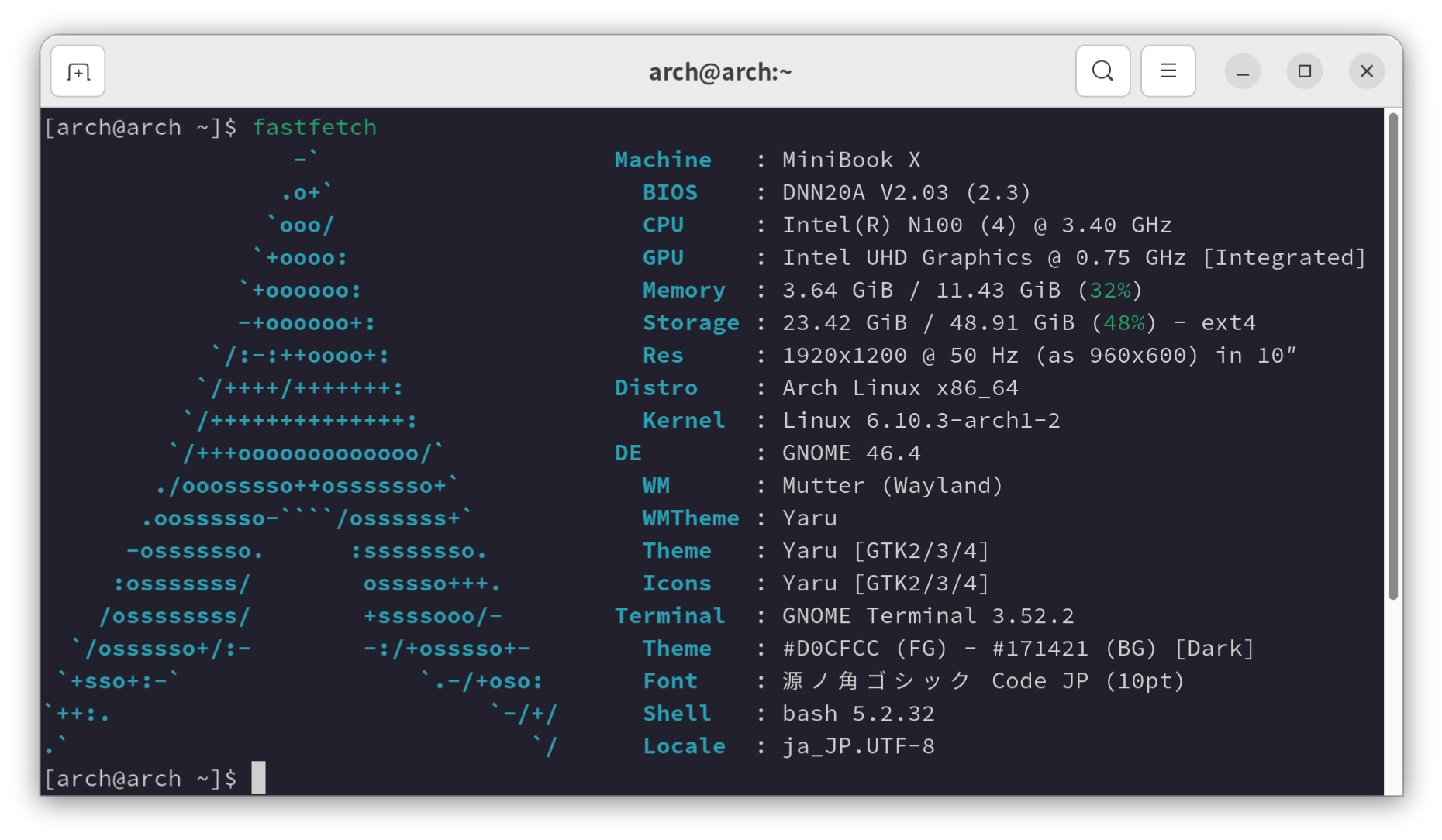
自宅のLinux PCのシステム情報をfastfetchを使って収集して表示するダッシュボードを作ってみました。

環境

  • Windows 11
    • WSL (Arch Linux)

構築

🛠️ 事前準備(各リモートLinux PC側)

  1. SSH鍵認証の設定
    WSL環境から各PCへ、パスワードなしでSSHログインできるように設定します。

    # WSL側で鍵を生成(未作成の場合のみ)
    ssh-keygen -t rsa -b 4000

    各リモートPCへ公開鍵をコピー

    ssh-copy-id user@<各PCのIPアドレス>
  2. 電源操作(sudo)のパスワードレス化
    各リモートPCで sudo visudo を実行し、末尾に以下を追記して保存します。

    user ALL=(ALL) NOPASSWD: /usr/sbin/reboot, /usr/sbin/shutdown

    user は各PCのユーザー名に書き換えてください。

  3. モジュールの確認
    各PCおよびWSL自身に fastfetch をインストールしてください。

📁 ディレクトリ構造

WSL上の任意の場所に以下の構造を作成します。

linux-monitor/
├── package.json
├── server.js
└── public/
└── index.html

mkdir -p linux-monitor/public
cd linux-monitor
npm init -y
npm install express ssh2

💻 バックエンドコード

server.js
const express = require('express');
const { Client } = require('ssh2');
const { exec } = require('child_process');
const fs = require('fs');
const path = require('path');

const app = express();
const PORT = 3000;

// 【設定】監視・制御対象のリモートLinux PCリスト
const hosts = [
{ host: 'minibookx.local', username: 'arch', privateKeyPath: '/home/arch/.ssh/id_rsa' },
{ host: 'raspi4b.local', username: 'ubuntu', privateKeyPath: '/home/arch/.ssh/id_rsa' },
{ host: 'zotac.local', username: 'arch', privateKeyPath: '/home/arch/.ssh/id_rsa' }
];

// リモートPCのfastfetch取得
function fetchFastfetch(config) {
return new Promise((resolve) => {
const conn = new Client();
conn.on('ready', () => {
conn.exec('fastfetch -c none --structure OS:Kernel:Uptime:CPU:Memory:Disk:GPU --format json', (err, stream) => {
if (err) return resolve({ host: config.host, error: err.message });
let data = '';
stream.on('data', (chunk) => { data += chunk; });
stream.on('close', () => {
try { resolve({ host: config.host, data: JSON.parse(data) }); }
catch (e) { resolve({ host: config.host, error: 'JSONパースエラー' }); }
conn.end();
});
});
}).on('error', (err) => {
resolve({ host: config.host, error: err.message });
}).connect({
host: config.host,
username: config.username,
privateKey: fs.readFileSync(config.privateKeyPath)
});
});
}

// ローカル(WSL自身)のfastfetch取得
function fetchLocalFastfetch() {
return new Promise((resolve) => {
exec('fastfetch -c none --structure OS:Kernel:Uptime:CPU:Memory:Disk:GPU --format json', (error, stdout) => {
if (error) return resolve({ host: 'WSL Server (Local)', error: error.message });
try { resolve({ host: 'WSL Server (Local)', data: JSON.parse(stdout) }); }
catch (e) { resolve({ host: 'WSL Server (Local)', error: 'JSONパースエラー' }); }
});
});
}

// リモートPCの電源操作
function runPowerCommand(config, action) {
return new Promise((resolve) => {
const conn = new Client();
const cmd = action === 'reboot' ? 'sudo reboot' : 'sudo shutdown -h now';

conn.on('ready', () => {
conn.exec(cmd, (err, stream) => {
if (err) return resolve({ success: false, error: err.message });
stream.on('close', () => {
resolve({ success: true });
conn.end();
});
});
}).on('error', (err) => {
if (err.code === 'ECONNRESET' || err.message.includes('read ECONNRESET')) {
resolve({ success: true }); // 切断は正常終了とみなす
} else {
resolve({ success: false, error: err.message });
}
}).connect({
host: config.host,
username: config.username,
privateKey: fs.readFileSync(config.privateKeyPath)
});
});
}

app.use(express.static(path.join(__dirname, 'public')));

// API: ステータス一括取得
app.get('/api/status', async (req, res) => {
const remotePromises = hosts.map(fetchFastfetch);
const [localResult, ...remoteResults] = await Promise.all([
fetchLocalFastfetch(),
...remotePromises
]);
res.json([localResult, ...remoteResults]);
});

// API: 電源操作実行
app.post('/api/power', express.json(), async (req, res) => {
const { host, action } = req.body;
const config = hosts.find(h => h.host === host);

if (!config) return res.status(404).json({ error: '対象PCが見つかりません' });
if (action !== 'reboot' && action !== 'shutdown') return res.status(400).json({ error: '無効な操作' });

const result = await runPowerCommand(config, action);
res.json(result);
});

app.listen(PORT, () => console.log(`Server running on port ${PORT}`));

const hostsを環境に合わせて設定します。

🎨 フロントエンドコード

public/index.html
<!DOCTYPE html>
<html lang="ja">
<head>
<meta charset="UTF-8">
<meta name="viewport" content="width=device-width, initial-scale=1.0">
<title>Linux Cluster Monitor</title>
<!-- Tailwind CSS をCDN経由で読み込み -->
<script src="https://cdn.tailwindcss.com"></script>
</head>
<body class="bg-slate-900 text-slate-100 min-h-screen font-sans">

<div class="container mx-auto px-4 py-8">
<!-- ヘッダーエリア -->
<header class="flex justify-between items-center mb-8 border-b border-slate-800 pb-4">
<div>
<h1 class="text-3xl font-extrabold tracking-tight bg-gradient-to-r from-emerald-400 to-cyan-400 bg-clip-text text-transparent">
Linux Cluster Monitor
</h1>
<p class="text-slate-400 text-sm mt-1">Agentless Fastfetch Dashboard</p>
</div>

<div class="flex items-center space-x-6">
<!-- 安全ロックトグルスイッチ -->
<label class="inline-flex items-center cursor-pointer select-none">
<span class="text-xs font-semibold uppercase tracking-wider text-slate-400 mr-3">電源操作ロック</span>
<div class="relative">
<input type="checkbox" id="safety-lock" class="sr-only peer" onchange="togglePowerButtons()">
<div class="w-11 h-6 bg-slate-700 peer-focus:outline-none rounded-full peer peer-checked:after:translate-x-full peer-checked:after:border-white after:content-[''] after:absolute after:top-[2px] after:start-[2px] after:bg-white after:border-slate-300 after:border after:rounded-full after:h-5 after:w-5 after:transition-all peer-checked:bg-rose-600"></div>
</div>
</label>
<!-- 手動更新ボタン -->
<button id="refresh-btn" onclick="loadStatus()" class="bg-emerald-600 hover:bg-emerald-500 text-white font-semibold py-2 px-4 rounded-lg shadow-lg hover:shadow-emerald-600/20 transition duration-200 text-sm">
手動更新
</button>
</div>
</header>

<!-- メイングリッド(PCカードが並ぶ場所) -->
<div id="pc-grid" class="grid grid-cols-1 md:grid-cols-2 xl:grid-cols-3 gap-6">
<div class="col-span-full text-center py-12 text-slate-400">
<span class="animate-pulse">PCの状態を収集しています...</span>
</div>
</div>
</div>

<script>
const UPDATE_INTERVAL = 60000; // 1分ごとに自動更新する周期(ミリ秒)

// メモリやディスクの文字列(例: "1.2GiB / 15.6GiB (7%)")をパースする関数
function parseUsage(usageString) {
if (!usageString || usageString === 'N/A') return { percent: 0, text: 'N/A' };
const percentMatch = usageString.match(/\((\d+)%\)/);
const percent = percentMatch ? parseInt(percentMatch, 10) : 0;
const text = usageString.split('(')[0].trim();
return { percent, text };
}

function formatBytes(bytes) {
if (!Number.isFinite(bytes) || bytes < 0) return 'N/A';
const units = ['B', 'KiB', 'MiB', 'GiB', 'TiB'];
let value = bytes;
let unitIndex = 0;
while (value >= 1024 && unitIndex < units.length - 1) {
value /= 1024;
unitIndex++;
}
const decimals = unitIndex === 0 ? 0 : 2;
return `${value.toFixed(decimals)} ${units[unitIndex]}`;
}

function formatMemory(memoryResult) {
if (!memoryResult || typeof memoryResult !== 'object') return parseUsage(memoryResult);

const total = memoryResult.total;
const used = memoryResult.used;
if (!Number.isFinite(total) || !Number.isFinite(used) || total <= 0 || used < 0) {
return { percent: 0, text: 'N/A' };
}

return {
percent: Math.round((used / total) * 100),
text: `${formatBytes(used)} / ${formatBytes(total)}`
};
}

function formatDisk(diskResult) {
if (!Array.isArray(diskResult)) return [];

return diskResult
.filter(disk => disk && disk.bytes && Number.isFinite(disk.bytes.total) && disk.bytes.total > 0 && Number.isFinite(disk.bytes.used))
.map(disk => ({
label: disk.mountpoint || disk.mountFrom || disk.filesystem || 'Unknown',
percent: Math.round((disk.bytes.used / disk.bytes.total) * 100),
text: `${formatBytes(disk.bytes.used)} / ${formatBytes(disk.bytes.total)}`
}));
}

function formatUptime(uptimeMilliseconds) {
if (typeof uptimeMilliseconds !== 'number' || !Number.isFinite(uptimeMilliseconds) || uptimeMilliseconds < 0) return 'N/A';

const totalSeconds = Math.floor(uptimeMilliseconds / 1000);
const days = Math.floor(totalSeconds / 86400);
const hours = Math.floor((totalSeconds % 86400) / 3600);
const minutes = Math.floor((totalSeconds % 3600) / 60);
const seconds = totalSeconds % 60;

const parts = [];
if (days > 0) parts.push(`${days}日`);
if (days > 0 || hours > 0) parts.push(`${hours}時間`);
if (days > 0 || hours > 0 || minutes > 0) parts.push(`${minutes}分`);
parts.push(`${seconds}秒`);
return parts.join(' ');
}

function formatCpu(cpuResult) {
if (!cpuResult || typeof cpuResult !== 'object') return cpuResult || 'N/A';

const cpuName = cpuResult.cpu || cpuResult.name || 'N/A';
const onlineCores = cpuResult.cores && cpuResult.cores.online;
const frequencyMHz = cpuResult.frequency && (cpuResult.frequency.base || cpuResult.frequency.max);
const coreText = Number.isFinite(onlineCores) ? ` (${onlineCores})` : '';
const frequencyText = Number.isFinite(frequencyMHz) && frequencyMHz > 0
? ` @ ${(frequencyMHz / 1000).toFixed(2)} GHz`
: '';

return `${cpuName}${coreText}${frequencyText}`;
}

function formatGpu(gpuResult) {
if (!Array.isArray(gpuResult)) return 'N/A';

const names = gpuResult
.map(gpu => gpu && gpu.name)
.filter(Boolean);
return names.length > 0 ? names.join(', ') : 'N/A';
}

// 使用率に応じてプログレスバーの色を返す関数
function getBarColor(percent) {
if (percent >= 90) return 'bg-rose-500';
if (percent >= 75) return 'bg-amber-500';
return 'bg-emerald-500';
}

// ステータス一括取得と画面描画を行うメイン関数
async function loadStatus() {
const btn = document.getElementById('refresh-btn');
if (btn) btn.disabled = true;

const grid = document.getElementById('pc-grid');
try {
const response = await fetch('/api/status');
const results = await response.json();
grid.innerHTML = '';

results.forEach(pc => {
const card = document.createElement('div');
const isWSL = pc.host === 'WSL Server (Local)';

// WSLとリモートPCでカードのデザインを分ける
if (isWSL) {
card.className = "bg-slate-800/80 backdrop-blur-md border border-cyan-500/40 rounded-xl p-6 shadow-xl shadow-cyan-950/20 hover:border-cyan-400 transition duration-300";
} else {
card.className = "bg-slate-800/50 backdrop-blur-md border border-slate-700/50 rounded-xl p-6 shadow-xl hover:border-emerald-500/50 transition duration-300";
}

// エラー時の処理
if (pc.error) {
card.innerHTML = `
<div class="flex items-center space-x-2 text-red-400 font-bold mb-2">
<span>⚠️</span> <h2>${pc.host}</h2>
</div>
<p class="text-xs text-slate-400 bg-red-950/30 p-3 rounded border border-red-900/50">${pc.error}</p>
`;
grid.appendChild(card);
return;
}

// fastfetch結果の配列から特定の項目を取り出すヘルパー
const resultArr = Array.isArray(pc.data) ? pc.data : (pc.data.result || []);

// オブジェクト構造に完全対応した値抽出ロジック
const getVal = (type, subKey = null) => {
const item = resultArr.find(i => i.type && i.type.toLowerCase() === type.toLowerCase());
if (!item || !item.result) return 'N/A';

if (typeof item.result === 'object') {
if (subKey && item.result[subKey]) return item.result[subKey];
return item.result.prettyName || item.result.name || item.result.release || JSON.stringify(item.result);
}
return item.result;
};

const os = getVal('OS', 'prettyName');
const kernel = getVal('Kernel', 'release');
const uptime = formatUptime(getVal('Uptime', 'uptime'));
const cpuItem = resultArr.find(i => i.type && i.type.toLowerCase() === 'cpu');
const cpu = formatCpu(cpuItem && cpuItem.result);
const gpuItem = resultArr.find(i => i.type && i.type.toLowerCase() === 'gpu');
const gpu = formatGpu(gpuItem && gpuItem.result);
const memoryItem = resultArr.find(i => i.type && i.type.toLowerCase() === 'memory');
const memoryInfo = formatMemory(memoryItem && memoryItem.result);
const diskItem = resultArr.find(i => i.type && i.type.toLowerCase() === 'disk');
const diskInfos = formatDisk(diskItem && diskItem.result);
const diskHtml = diskInfos.length === 0
? '<p class="text-xs text-slate-500">N/A</p>'
: diskInfos.map(diskInfo => `
<div>
<div class="flex justify-between items-center text-xs mb-1.5"><span class="text-slate-500 font-medium">${diskInfo.label}</span><span class="font-mono text-slate-300">${diskInfo.text} <b class="ml-1 text-white">${diskInfo.percent}%</b></span></div>
<div class="w-full bg-slate-900 rounded-full h-2 overflow-hidden border border-slate-700/30"><div class="${getBarColor(diskInfo.percent)} h-2 rounded-full transition-all duration-500 ease-out" style="width: ${diskInfo.percent}%"></div></div>
</div>
`).join('');

// ホストに応じたインジケーター等の色定義
const badgeColor = isWSL ? 'bg-cyan-400' : 'bg-emerald-400';
const badgeBg = isWSL ? 'bg-cyan-500' : 'bg-emerald-500';
const hostTitleColor = isWSL ? 'text-cyan-200' : 'text-white';

// 基本情報のHTML組み立て
let html = `
<div class="flex justify-between items-start mb-4">
<div>
<h2 class="text-xl font-bold tracking-wide ${hostTitleColor}">${pc.host}</h2>
</div>
<span class="flex h-3 w-3 relative">
<span class="animate-ping absolute inline-flex h-full w-full rounded-full ${badgeColor} opacity-75"></span>
<span class="relative inline-flex rounded-full h-3 w-3 ${badgeBg}"></span>
</span>
</div>

<div class="space-y-3 text-sm text-slate-300">
<div class="flex justify-between border-b border-slate-700/30 pb-1"><span class="text-slate-500">Distribution:</span><span class="font-mono text-xs">${os}</span></div>
<div class="flex justify-between border-b border-slate-700/30 pb-1"><span class="text-slate-500">Kernel:</span><span class="font-mono text-xs">${kernel}</span></div>
<div class="flex justify-between border-b border-slate-700/30 pb-1"><span class="text-slate-500">Uptime:</span><span>${uptime}</span></div>
<div class="flex justify-between border-b border-slate-700/30 pb-1"><span class="text-slate-500">CPU:</span><span>${cpu}</span></div>
<div class="flex justify-between border-b border-slate-700/30 pb-1"><span class="text-slate-500">GPU:</span><span>${gpu}</span></div>
</div>

<!-- プログレスバーエリア -->
<div class="space-y-4 mt-4 pt-3 border-t border-slate-700/30">
<div>
<div class="flex justify-between items-center text-xs mb-1.5"><span class="text-slate-500 font-medium">Memory</span><span class="font-mono text-slate-300">${memoryInfo.text} <b class="ml-1 text-white">${memoryInfo.percent}%</b></span></div>
<div class="w-full bg-slate-900 rounded-full h-2 overflow-hidden border border-slate-700/30"><div class="${getBarColor(memoryInfo.percent)} h-2 rounded-full transition-all duration-500 ease-out" style="width: ${memoryInfo.percent}%"></div></div>
</div>
<div class="space-y-4">
<div class="text-xs text-slate-500 font-medium">Disk (Storage)</div>
${diskHtml}
</div>
</div>
`;

// リモートPCの場合のみ電源ボタンを追加(初期状態はdisabled)
if (!isWSL) {
html += `
<div class="mt-5 pt-3 border-t border-slate-700/30 flex justify-end space-x-2">
<button onclick="controlPower('${pc.host}', 'reboot')" disabled class="power-btn bg-slate-700 hover:bg-amber-600 text-slate-200 hover:text-white font-medium py-1 px-2.5 rounded text-xs transition duration-200 disabled:opacity-40 disabled:hover:bg-slate-700 disabled:cursor-not-allowed">再起動</button>
<button onclick="controlPower('${pc.host}', 'shutdown')" disabled class="power-btn bg-slate-700 hover:bg-rose-600 text-slate-200 hover:text-white font-medium py-1 px-2.5 rounded text-xs transition duration-200 disabled:opacity-40 disabled:hover:bg-slate-700 disabled:cursor-not-allowed">シャットダウン</button>
</div>
`;
}

card.innerHTML = html;
grid.appendChild(card);
});
} catch (error) {
grid.innerHTML = `<div class="col-span-full text-center text-red-400 py-12">サーバーとの通信に失敗しました。</div>`;
} finally {
if (btn) btn.disabled = false;
togglePowerButtons(); // 描画更新後に現在のトグルの状態を再適用
}
}

// ロックトグルのON/OFFに合わせてボタンのdisabled状態を切り替える関数
function togglePowerButtons() {
const isLocked = !document.getElementById('safety-lock').checked;
document.querySelectorAll('.power-btn').forEach(btn => {
btn.disabled = isLocked;
});
}

// 電源操作APIを叩く関数
async function controlPower(host, action) {
const actionText = action === 'reboot' ? '再起動' : 'シャットダウン';
if (!confirm(`${host} を本当に ${actionText} しますか?`)) return;

try {
const response = await fetch('/api/power', {
method: 'POST',
headers: { 'Content-Type': 'application/json' },
body: JSON.stringify({ host, action })
});
const result = await response.json();
if (result.success) {
alert(`${actionText} コマンドを送信しました。`);
loadStatus();
} else {
alert(`エラー: ${result.error}`);
}
} catch (error) {
alert('通信に失敗しました。');
}
}

// 安全なポーリング制御(処理が終わってから次のタイマーをセット)
async function startPolling() {
await loadStatus();
setTimeout(startPolling, UPDATE_INTERVAL);
}

// 初回実行
startPolling();
</script>
</body>
</html>

🚀 常駐化の設定(systemdユーザーサービス)

~/.config/systemd/user/pc-monitor.service
[Unit]
Description=Linux PC Monitor Web Server
After=network.target

[Service]
Type=simple
ExecStart=/usr/bin/node /PATH_TO/linux-monitor/server.js
Restart=always

[Install]
WantedBy=default.target

/usr/bin/node やパス/PATH_TO/は環境に合わせます。

サービスを起動します:

systemctl --user daemon-reload
systemctl --user enable pc-monitor.service
systemctl --user start pc-monitor.service

コードを書き換えた後は以下のコマンドを実行してサービスを再起動します。

systemctl --user restart pc-monitor.service

サービス定義ファイル(.service ファイル)自体を書き換えた場合は、再起動の前に以下の設定再読み込みコマンドを実行してください。

systemctl --user daemon-reload
systemctl --user restart pc-monitor.service

利用

Windows側のブラウザから http://localhost:3000 を開くことでダッシュボードにアクセスできます。